AI Tools
What Is ChatGPT Work? I Tested Whether It Can Actually Do the Work
ChatGPT has always given us answers. ChatGPT Work promises something much bigger: finished work. I put that promise to the test.

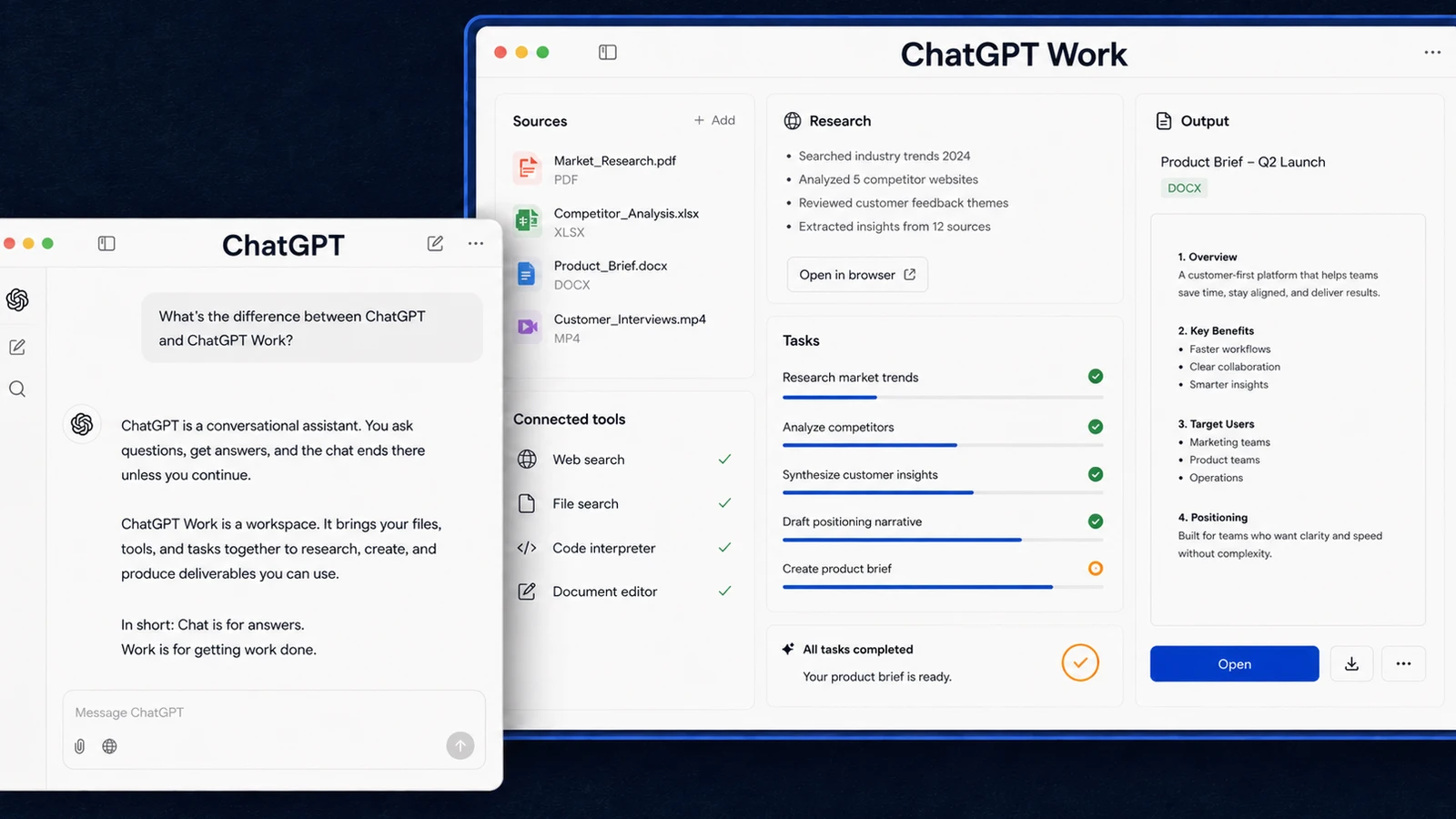
ChatGPT has spent years telling us how to do things. ChatGPT Work is OpenAI's attempt to take the files, handle the steps, and hand back the finished work.
That sounds like a much bigger promise than another smarter chatbot, so I tested it on a job I already had: a folder full of Amazon invoices that needed to become one monthly expense total.
The result showed me where Work is genuinely useful, where regular ChatGPT is still the better choice, and why you should not hand it an important task without checking what comes back.
What is ChatGPT Work?
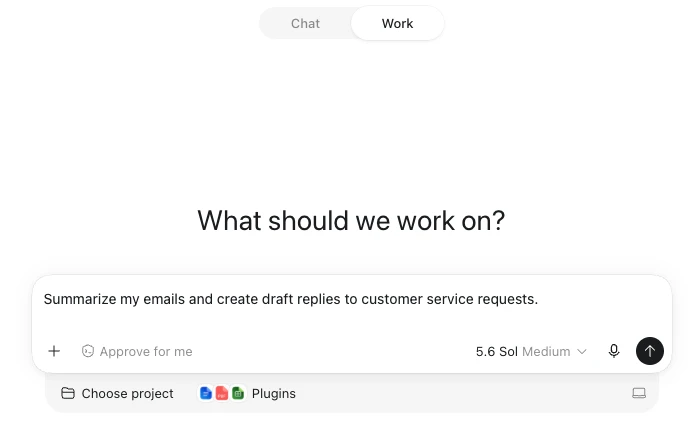
ChatGPT Work is a mode inside ChatGPT for tasks that need more than an answer.
You give it a clear outcome, the source material it needs, and any boundaries it should follow. It can then work through several steps, use files and approved tools, and produce something you can review, such as a spreadsheet, presentation, report, brief, or recurring update.
You can follow its progress, answer questions, redirect it, and approve consequential actions. You are still responsible for checking the result before you rely on it or share it. OpenAI describes ChatGPT Work as a way to delegate substantial tasks and receive reviewable results.
The short version is:
Regular ChatGPT helps you think through the job. ChatGPT Work is designed to carry out more of it.
What's the difference between ChatGPT and ChatGPT Work?
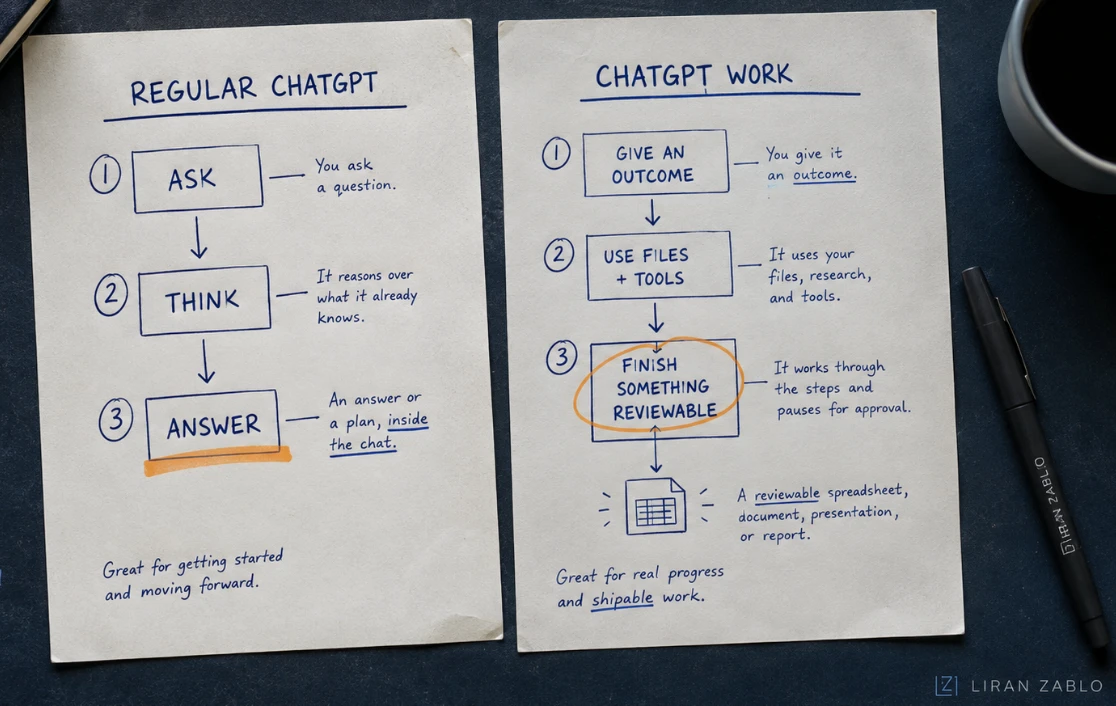
Regular ChatGPT can already read uploaded files, analyze information, write content, and help create documents. Work does not make those abilities appear for the first time.
The difference becomes clearer when you use the same task in both modes.
Imagine you have 30 invoices and want to know how much you spent last month.
In a regular ChatGPT conversation, you might upload some files, ask how to organize them, request a formula, or work through the totals with the assistant. It can be very helpful, but the conversation often revolves around advice and individual responses.
In ChatGPT Work, you can give it the invoices and define the finished result: review every file, extract the amounts, calculate the total, flag anything uncertain, and return an organized summary for you to check.
One helps you work through the problem. The other is built to take a clearer assignment across multiple steps and return a deliverable.
When regular ChatGPT is enough
Use regular ChatGPT when you want to ask a question, brainstorm, challenge an idea, improve a paragraph, compare a few options, or think through what you should do next.
When Work earns the extra effort
Use Work when the task has a specific outcome, several connected steps, source files or tools, and a result you can inspect. Examples include turning receipts into an expense summary, research into a presentation, or several quotes into a comparison spreadsheet.
Brainstorming can involve a lot of back-and-forth, while Work becomes more useful after you know what outcome you want.
The invoice test that made ChatGPT Work click for me
I run an Amazon-to-eBay business. When an order comes through on eBay, I buy the product from Amazon and save the invoice for my accountant.
By the end of the month, I have a folder full of separate invoices. Someone normally has to open each one, find the final amount, and add everything together. The job is repetitive and easy to get wrong.
I gave ChatGPT Work access to the folder and asked it to review the invoices and calculate my total monthly expenses.
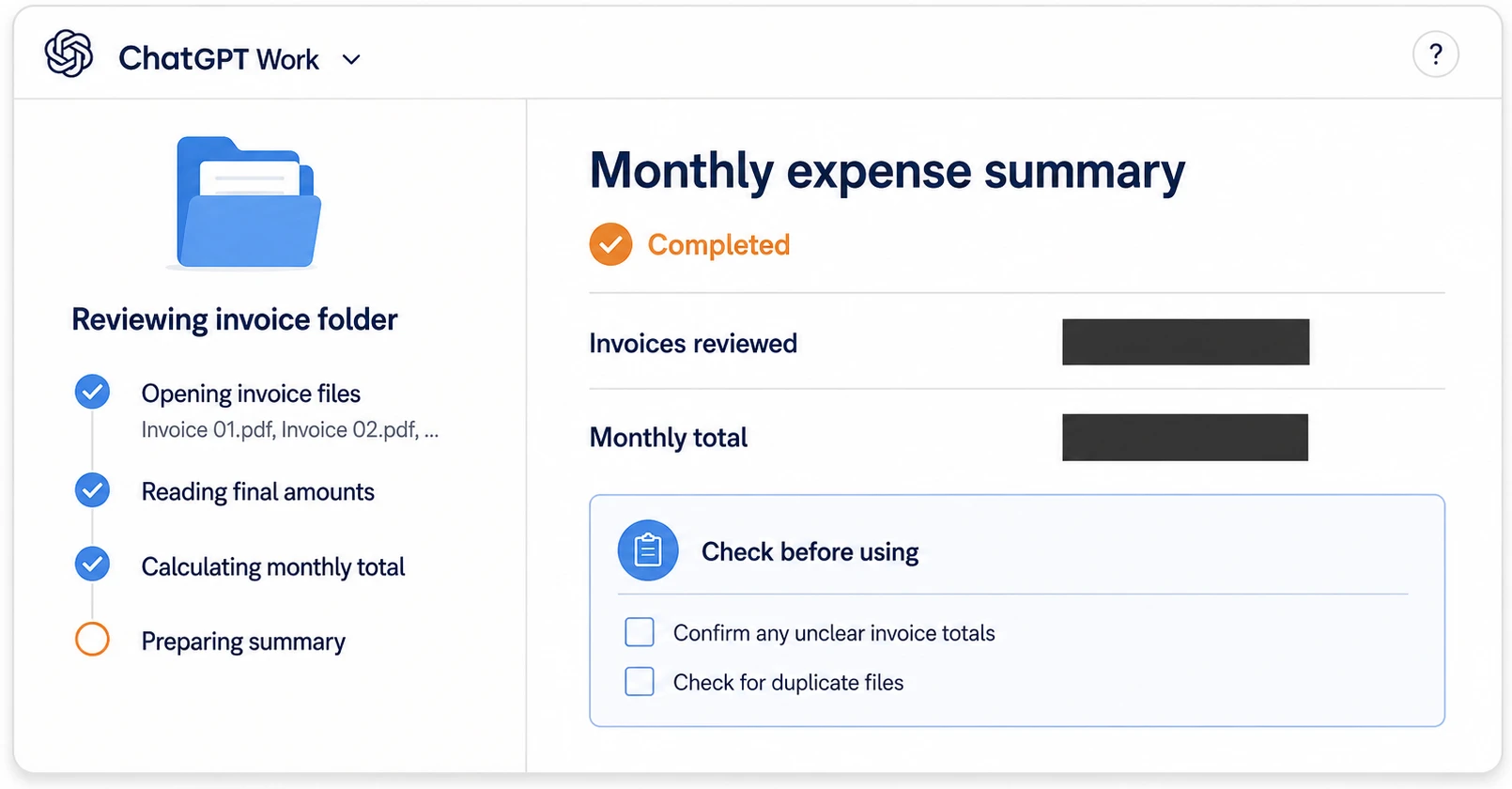
I was not asking AI to explain accounting or invent a system. I gave it the actual source files and a specific outcome. It went through the folder, calculated the total, and made the monthly handoff easier without my accountant or me opening every invoice manually.
This was not a dramatic demo. It was a boring task I already needed to complete, which is exactly where I see the biggest opportunity. Work is most useful when it removes the mechanical steps hiding inside a normal week.
What can you realistically do with ChatGPT Work?
The best tasks usually include three ingredients: a clear outcome, source material Work can use, and a result you know how to inspect.
Here is what that looks like in practice.
Turn receipts into an expense summary
Give Work a folder of invoices or receipts. Ask it to extract the dates, vendors, amounts, currencies, refunds, and totals, then return a spreadsheet and flag anything unreadable or uncertain.
You receive an organized starting point instead of a pile of files. Check the totals yourself and let your accountant make the final accounting decisions.
Turn scattered research into a content plan
Provide competitor articles, video transcripts, customer questions, performance data, and your own notes. Ask Work to identify repeated claims, gaps, and useful angles, then turn the findings into a content brief or publishing plan.
The source material keeps the result connected to real information instead of another generic list of ten ideas.
Compare an expensive purchase in a spreadsheet
Give Work the quotes, product pages, notes, and requirements for the options you are considering. Ask it to build a comparison around the criteria you care about, show what information is missing, and explain the tradeoffs.
You still make the decision. Work organizes the evidence so you do not have to keep the whole comparison in your head.
Turn raw material into a presentation
Upload meeting notes, research, survey results, or an existing report. Define the audience and the decision the presentation needs to support. Work can create a structured deck, connect claims to the supplied evidence, and flag gaps that need your input.
OpenAI recommends presentations and comparison spreadsheets as useful first tasks because both end with something clear enough to review. See OpenAI's first-task examples.
Prepare a recurring update
When the required tools are connected, Work can collect new information on a schedule and prepare an update for review. A weekly run could check project documents and team messages, then refresh an agenda with decisions, blockers, and unanswered questions.
Scheduled tasks and connected tools depend on your plan, platform, and workspace settings.
How do you access ChatGPT Work?
Open ChatGPT and select Work using the Chat/Work switch above the composer. Once Work is selected, click the computer icon in the bottom-right corner to choose whether the task runs On your computer or In the cloud. The image below shows both steps.
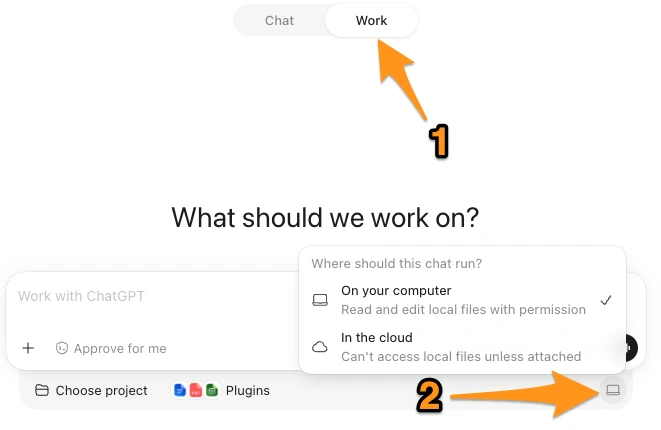
Free and Go plans currently include limited Work access in the desktop app, while Plus and Pro include broader access across desktop, web, and mobile. The ChatGPT pricing page shows the latest Work availability and usage limits for each plan.
How should you try Work for the first time?
Do not start with your most important or complicated business process. Choose a small, annoying task where you can easily check whether ChatGPT Work got the result right.
A first task could be five receipts that need organizing, three service quotes that need comparing, or several notes that need to become a short presentation.
Then follow this process:
- Decide what the finished result should be.
- Give Work only the files or tools it needs.
- Explain what it may change and what must stay untouched.
- Ask it to flag uncertainty instead of guessing.
- Compare the result with the original source material.
A useful prompt covers the outcome, sources, boundaries, checks, and review point:
Use [these files, folders, or tools] to create [the exact deliverable]. Include [the requirements]. Do not [the restrictions]. Check [the facts, totals, sources, formatting, or other quality criteria]. Flag anything uncertain instead of guessing. Stop and ask me before [an important or irreversible action]. Return the result for my review.
For the invoice task, I could use:
Review every invoice in this folder and calculate the total expenses for July. Create a table with the invoice date, order number, vendor, currency, and final amount paid. Flag duplicates, refunds, unreadable files, and anything you are uncertain about. Do not guess missing values. Give me the summary and list of exceptions before changing or sharing any files.
Specific inputs and checking rules are more useful than asking the tool to act like a "world-class expert."
Should you run Work locally or in the cloud?
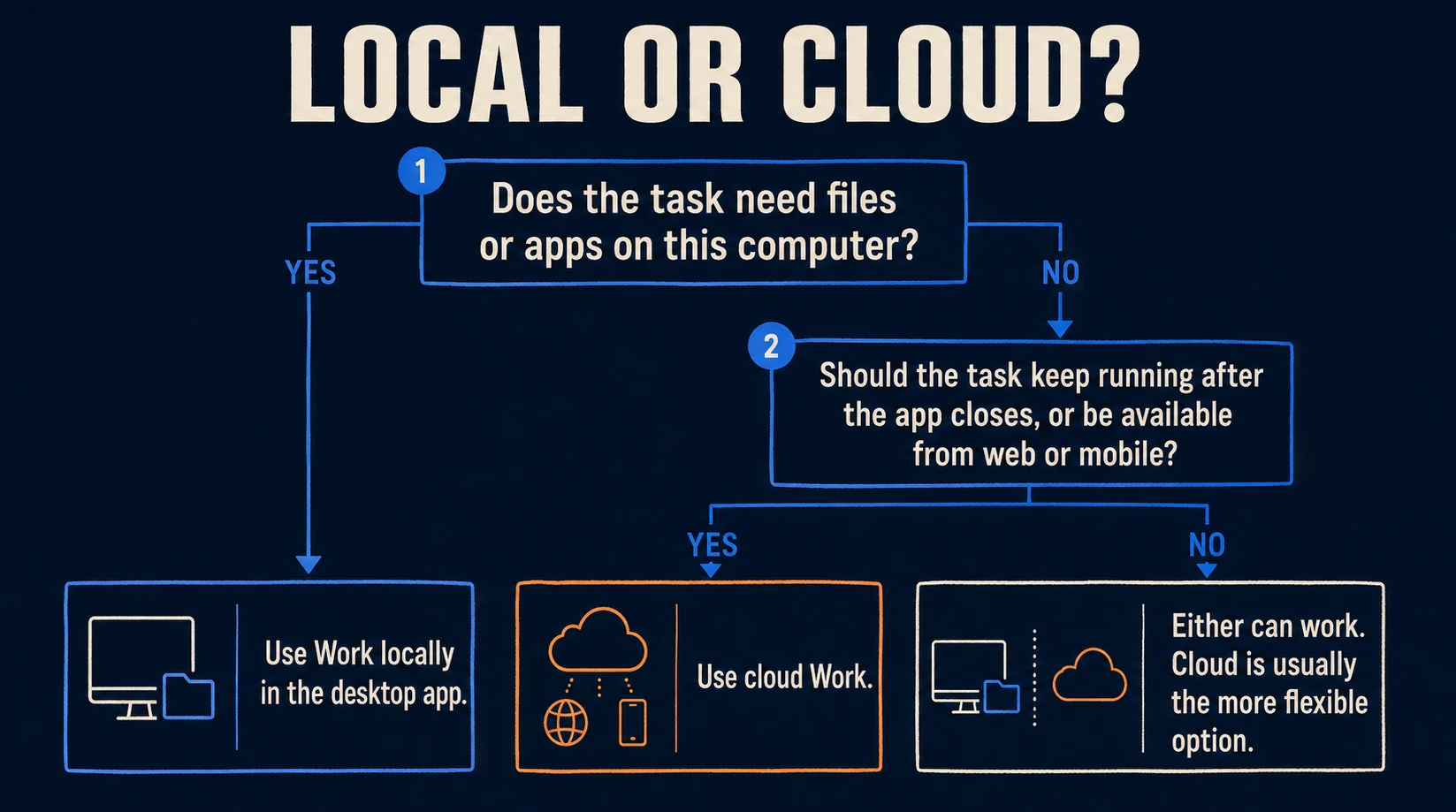
The local-versus-cloud choice sounds technical, but you are mainly deciding where the task runs, what it can reach, and whether it should continue when your computer is unavailable.
Local and cloud are not two intelligence levels. One is not automatically better at reasoning than the other.
A task that needs local Work
Suppose you have a folder containing 70 invoices on your computer and do not want to upload each file individually. Local Work can use the folder after you attach it to the project and grant the relevant access.
Use local Work when the task needs files, apps, or browser access on that computer. ChatGPT's project settings let you attach one or more local folders and control which files the project can reach. Read OpenAI's guide to local projects and folders.
A task that fits cloud Work
Suppose you upload three reports, ask Work to compare them, and want the job to continue after you close the desktop app. You may also want to check the result later from your phone.
Cloud Work runs in an isolated hosted environment. It can use uploaded files, connected tools, and approved websites, and it can continue after your computer is turned off. OpenAI explains the local and cloud environments here.
My shortcut is simple:
If the task needs something stored on my computer, I use local. If I want it to continue without my computer, I use cloud.
What can ChatGPT Work still get wrong?
Work can complete more steps than a normal chat, but a longer task also creates more places for a mistake to hide.
It can misunderstand the assignment
If you say "organize this folder" without defining the result, Work may choose a structure you did not want. Tell it what the output should look like, what it may change, and what must remain untouched.
A polished result can still be wrong
A clean spreadsheet can contain a bad total. A convincing presentation can include a weak claim. Check numbers, sources, and decisions that could cost money or create a problem.
It can reach sensitive information
Do not attach an entire drive when the task only needs one folder. Remove unnecessary personal information, use the narrowest access possible, and review consequential actions before approving them.
OpenAI recommends starting with Ask for approval, which lets ChatGPT work inside the current workspace and pauses before it crosses that boundary. Read OpenAI's permission guide.
It does not replace professional judgment
An accountant should still review accounting. You should still decide whether a report is ready to send, a purchase makes sense, or a presentation is accurate enough to share.
Work reduces mechanical steps. It does not take responsibility for the outcome.
Is ChatGPT Work worth using?
If the task ends with an answer, a quick brainstorm, or a short rewrite, regular ChatGPT is usually faster and simpler.
If it ends with a spreadsheet, presentation, report, recurring update, or another deliverable built from several sources, Work is the better fit.
My invoice test convinced me that ChatGPT Work is a major upgrade for regular people. You still need to think through the assignment and check the result, but Work can take a real pile of source material much closer to something finished and usable.
Frequently asked questions
Can regular ChatGPT already analyze files?
Yes. Regular ChatGPT can read uploaded files, answer questions about them, and help create content. Work becomes more useful when the assignment involves several sources, connected steps, approved tools, longer execution, or a finished deliverable you want to review.
Is ChatGPT Work the same as regular ChatGPT?
No. They share many capabilities, but the experience is organized around a different outcome. Chat is best for questions, explanations, brainstorming, and back-and-forth. Work is designed to carry a clearer assignment across several steps and return something reviewable.
Is ChatGPT Work free?
OpenAI currently lists limited Work access on the desktop app for Free and Go plans. Plus and Pro include broader access on desktop, web, and mobile. Usage limits apply and availability can change, so check the current ChatGPT pricing page.
Can ChatGPT Work access files on my computer?
Yes, when you use the desktop app with a local project and give it access to the relevant folder. It does not automatically need access to everything on your computer. What it can reach depends on the folders you attach, your permissions, and any workspace restrictions.
What is the difference between local and cloud Work?
Local Work can use files, apps, or the browser on your computer when enabled. Cloud Work runs remotely, can use uploaded files and connected tools, and can continue after you close the app or turn off your computer.
Can ChatGPT Work browse websites?
Yes, when browser access is available and permitted. You can follow its progress, and it may pause for approval before consequential actions.
Should I use ChatGPT Work for every task?
No. Use regular ChatGPT for quick questions and early back-and-forth. Use Work when the task has a clear outcome, source material, several steps, or a finished output.
About Liran Zablo
Liran Zablo has spent nearly a decade building ecommerce businesses, websites, content systems, and online marketing campaigns. As Head of Content at AutoDS, he built the company's content and education engine across YouTube, SEO, and long-form courses. On liranzablo.com, he explains important changes in AI through practical examples and tests how these tools can help normal people build and grow online businesses.